
Virtual cards for insurance agencies
Stop sending field adjusters out to front fuel and hotels and wait months to be made whole. Issue a capped virtual Visa card per adjuster or per claim, named for the claim number, locked to the right spend where supported, so every charge ties back to the claim. Close the card when the claim settles, and the leftover funds return to your wallet. Here is how the card is set, what you can lock, and how it reconciles itself.









Adjusters front the hotel, the fuel, and the meals, then wait to be made whole.
An independent adjuster is deployed to a catastrophe and pays out of their own pocket. Then they wait.
- Field staff carry the firm’s costs. The hotel, the fuel, and the meals go on a personal card, and reimbursement is chased afterwards.
- Property claims settle slowly. Field staff can sit from one season to the next before they are made whole; many are lucky to break even on their first few storms.
- One agency Visa, no claim attached. A statement line reading “agency Visa $4,280” says nothing about which claim it belongs to.
- Nothing caps a deployment. With no ceiling per adjuster or per claim, the approved spend amount exists only on paper.
- A catastrophe roster is built one card at a time. Standing up a whole deployment means issuing cards one by one when speed matters most.
A card per adjuster or per claim, named for the claim number.
Issue a capped virtual Visa card per adjuster or per claim, locked to the right spend where supported. There is no credit check, and the card is wallet-funded.
- A hard cap per adjuster or per claim. Set the approved spend amount per transaction, per day, per month, or per year, so a deployment card can run on a monthly budget with a daily ceiling on top.
- Field staff stop fronting money. The card carries the spend, so the adjuster does not put a hotel on a personal card and chase reimbursement.
- Locked to the right spend. Restrict a deployment card to restoration, hardware, and equipment-rental merchants, lodging, travel, or fuel; tie a mitigation card to one authorized supplier, where supported.
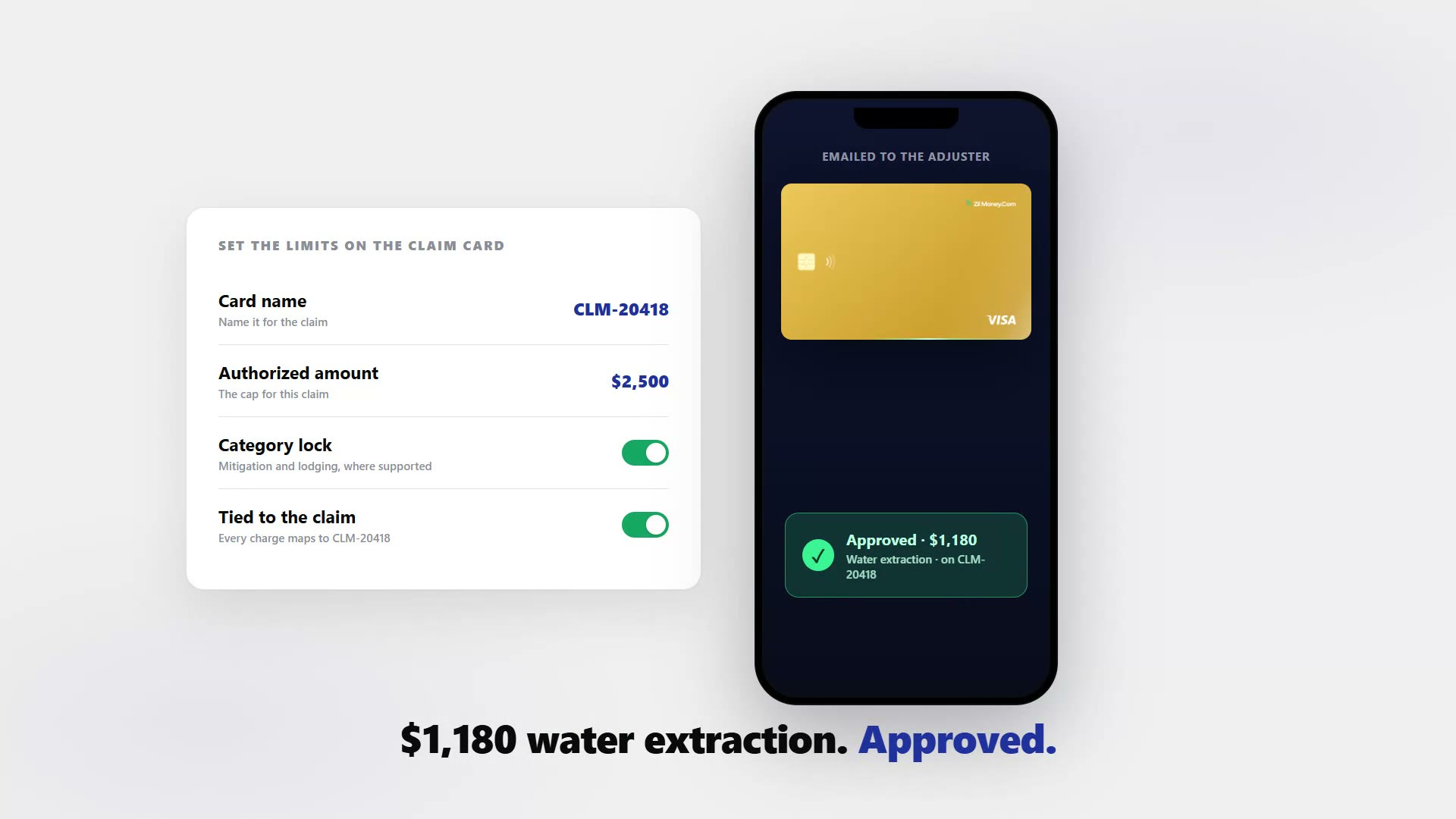
- The card name is the claim number. Name it CLM-20418 and every charge lands under it, so the record is already grouped by the time you look at it.
- No banking details leave the agency. The card is emailed and works in Apple Wallet and Google Wallet. The recipient only ever holds the card. It is the same model behind handing spend to accountants or individual departments.
- Close it at settlement. Cancel the card in one tap and the leftover funds return to your wallet. Bulk-issue a whole catastrophe roster from an Excel file or the API.
Four steps from a new claim to a card the adjuster can use today.
- 01
Fund your wallet.
Load operating funds by ACH or wire. No credit check, no personal bank link.
- 02
Make the card.
Create a card per adjuster or per claim, named for the claim number, with the approved spend amount as the hard cap.
- 03
Lock the spend.
Restrict it to restoration, hardware, and equipment-rental merchants, lodging, travel, or one vendor, where supported, then email it to the adjuster.
- 04
Track and close.
Watch every charge in the dashboard grouped by claim, with receipts you can export. At settlement, close the card and the leftover funds return to your wallet.
Every charge grouped by claim, ready for the claims desk.
Each card has a live transaction feed with categorized receipts, and you export per card, which means per claim. For the full workflow, see how to reconcile virtual card payments.

Live dashboard
Active cards, spend by claim and adjuster, declined attempts, every charge as it happens.

Issue an adjuster or claim card
Pick the card type, set the approved spend amount, choose virtual or physical, email it to the adjuster.
What you can set on every adjuster or claim card.
ControlWhat you setWhy it matters
Spend limit
Approved amount per transaction, day, month, or yearA hard limit. A charge cannot go over the cap.
Store categories
Restoration, hardware, equipment rental, lodging, travel, or fuel, where supportedThe card stays on claim spend and declines a charge that does not belong on it.
Time window
Start and end dates of the deploymentThe card matches the deployment rather than outliving it.
Cardholder name
The claim or policy numberEvery charge maps to one claim, so reconciliation is built in.
One-time or reusable
ToggleA single mitigation purchase or an ongoing deployment budget.
Three ways agencies use virtual cards.
- Field card / R. Coleman
An adjuster field card with an approved spend amount of $1,800 a month and a $450 daily cap, locked to fuel, lodging, travel, and meals where supported. A $470 same-day overrun is declined until the next day.
- Mitigation card / CLM-20418
A claim restoration card with a $2,500 approved amount, locked to restoration, hardware, and equipment-rental merchants. Tarps, a water-extraction rental, and drying fans all clear inside the cap.
- Settlement / close and recover
When the claim settles, close the mitigation card and the remaining balance returns to the wallet. Both cards export to a single per-claim record.
Two things to be clear about. This is expense control for the agency’s and adjuster’s own operating spend and firm-authorized vendor and mitigation spend; it does not issue claim payments to insureds, settle claims, or hold premium, trust, or fiduciary funds. And the cap is a hard limit while the locks are strong guardrails, not guarantees — category, merchant, location, and time locks work on the merchant data the card network passes, so a mis-coded merchant can let an off-list charge through. Other regulated practices handle client money the same way: see virtual cards for law firms.
Common questions.
Can I tie every charge back to a claim or policy number?
Yes. Name each card for the claim or policy number, for example CLM-20418 / Mitigation. Every transaction on that card shows under it on the live dashboard with receipts, so you can export a clean per-claim record for the claims desk and reconcile each charge to the claim. This is for the agency's and adjuster's own and firm-authorized vendor expenses, not claim payments to insureds.
Is there a credit check?
No. Cards are wallet-funded. You load your Zil Money wallet by ACH or wire, then cards draw from that balance. There is no personal bank link and no credit check.
Can I close the card when the claim settles?
Yes. Freeze or revoke any card in one tap from any device. Cancel the card at settlement and the leftover funds return to your wallet.
Can field staff and vendors use it without our agency banking details?
Yes. The card is emailed to the recipient and works in Apple Wallet and Google Wallet anywhere Visa is accepted. The adjuster or vendor never sees your banking details.
Can I export per-claim reports for reconciliation?
Yes. Each card has a live transaction feed with categorized receipts. Export per card, which means per claim, so reconciliation against the claim number is built in.
Related setups.
- Industries
Virtual cards for staffing agencies, one card per placement.
Staffing agencies carry the cost of reimbursing placed workers for job-related expenses, including uniforms, tools, and travel to the client site, while the billing cycle lags by w
4 min read - Industries
Virtual cards for agencies
When your agency runs ten clients' ad budgets on one card, every month-end is a guessing game. A card per client budget caps each one, keeps client spend separate, and makes rebill
5 min read - Industries
Virtual cards for travel agencies: pay suppliers per booking.
Stop fronting cash on one shared agency card and untangling the statement at month-end. Issue a wallet-funded virtual Visa for each booking, capped to the supplier's net rate and l
5 min read
Issue the first one this afternoon.
Insurance agencies take about a minute each: pick the type, set the limit, add the restrictions, send it.