
Virtual cards for travel agencies: pay suppliers per booking.
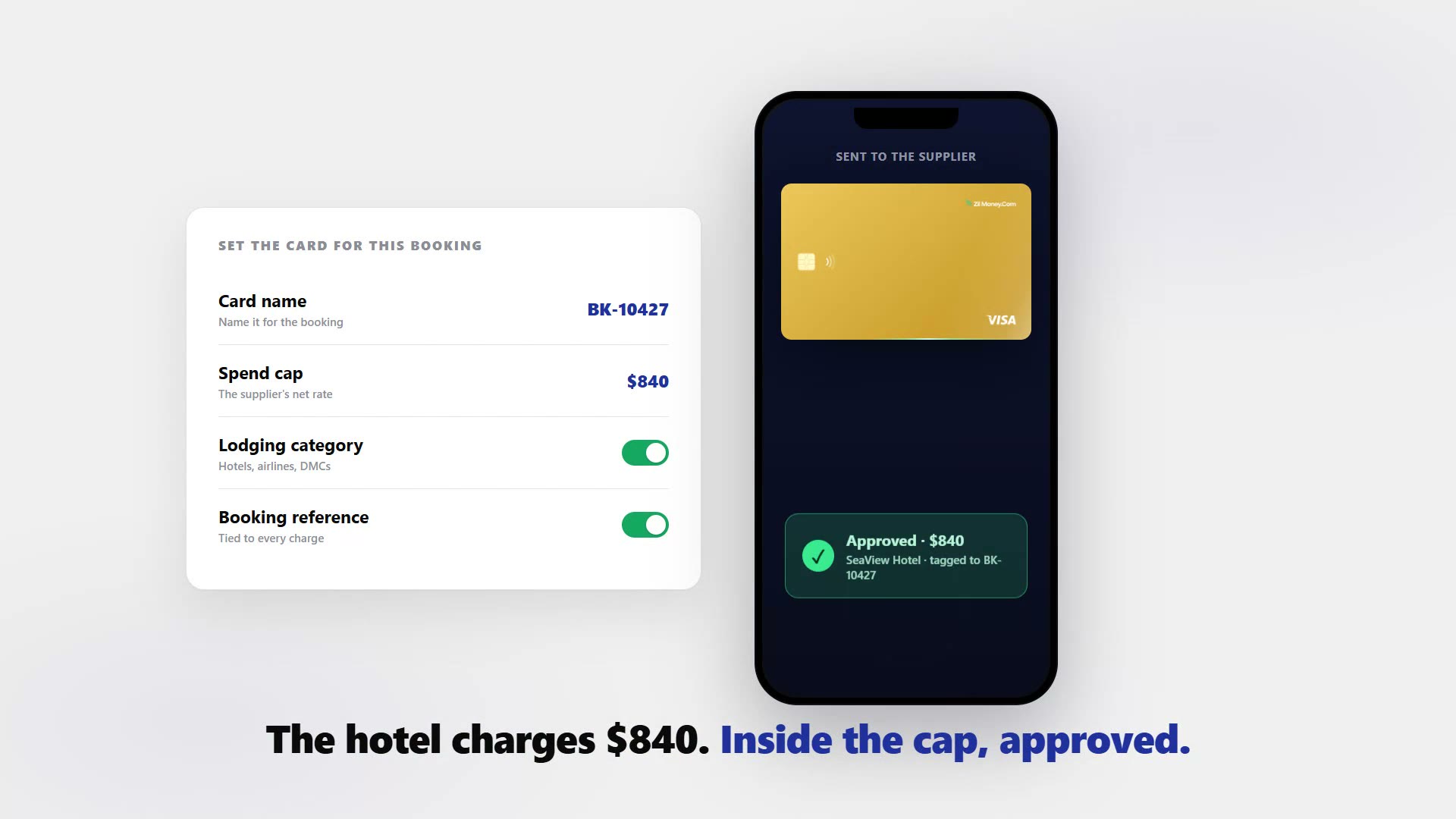
Stop fronting cash on one shared agency card and untangling the statement at month-end. Issue a wallet-funded virtual Visa for each booking, capped to the supplier's net rate and locked to the lodging or airline category, then hand it to the hotel, airline, or DMC. The supplier charges that card and nothing else, every charge carries the booking reference, and you match one card to one booking instead of chasing hundreds of trips across a single account.









The hard part was never selling the trip. It is the payout side.
You front the net rate to a hotel or an airline before the client has paid you in full, then you wait for the charge to land.
- Forty charges on one company card. Remembering which one belongs to which booking is the month-end job.
- Nothing caps what a supplier takes. Resort fees and add-ons you never approved clear because the shared card has no ceiling per booking.
- Commission tracking gets muddy. When every trip shares an account, the net cost per booking has to be reconstructed rather than read.
- One disputed charge is bounded by the whole credit line. A duplicate on a shared number is exposed to everything the account can spend.
- A cancelled booking leaves a live number. Nothing is scoped to the trip, so the supplier keeps a card that still works.
One card per booking, capped to the supplier's net rate.
Create a wallet-funded Visa for one booking, set the cap to what the supplier quoted, and hand it to the hotel, airline, or DMC. They charge that card and nothing else.
- Capped to the net cost. A charge inside the cap is approved and an overcharge is declined, so add-ons you never approved do not clear.
- The authorization gap is where it earns its keep. The hotel authorizes at check-in and settles at checkout; the authorized amount is the amount you agreed to.
- Every card carries the booking reference. You match one charge to one booking with the receipt attached, instead of chasing hundreds of trips across a single account.
- Category lock where supported. Restrict the card to the travel or lodging merchant category so it only works at that kind of supplier.
- Exposure bounded to one booking. A disputed or duplicated charge is limited by that card’s cap, not by the credit line on a shared account. Refunds return to the same card and the money comes back to your wallet.
- No credit check, issued at volume. Create cards one at a time, in bulk from an Excel sheet, or through the API as bookings come in. This is the supplier-payout companion to virtual cards for business travel, which covers funding your own travelling employees.
Four steps from a confirmed booking to a matched charge.
- 01
Make a card.
Create a card for the booking and fund it from your wallet.
- 02
Set the cap.
Set it to the supplier’s quoted net cost — never the gross client price — and lock it to the lodging or airline category where supported.
- 03
Send it to the supplier.
Email the card or add it to a wallet for the reservation. The supplier runs it like any Visa.
- 04
Match and close.
The charge clears against the cap and posts with the booking reference. Reconcile against settled activity before you call a booking closed.
One card, one booking, one charge to match.
Watch each charge post under the booking reference it belongs to, with the receipt attached. Issue, freeze, top up, or close any card from the same screen. For the wider workflow, see virtual cards for accounts payable.

Live dashboard
Active cards, spend by booking and supplier, declined attempts, every charge as it settles.

Issue a booking card
Pick the card type, set the cap to the supplier's net rate, choose virtual or physical, send it to the supplier.
What you can set on every booking card.
ControlWhat you setWhy it matters
Spend limit
The supplier's quoted net costA charge inside the cap is approved; an overcharge at checkout is declined.
Store categories
Travel or lodging category, where supportedThe card only works at that kind of supplier based on supported controls.
Time window
Start and end dates of the stayThe card matches the reservation rather than staying live after it.
Cardholder name
The booking referenceOne charge matches one booking, which keeps commission tracking clean.
One-time or reusable
ToggleA single reservation or a standing account with one supplier.
Three ways agencies use virtual cards.
- Hotel booking / net rate cap
Cap the card at the quoted net rate. The property authorizes at check-in and settles at checkout, and anything tacked on above the cap is declined.
- DMC or airline / per booking
Issue a card for each supplier on a trip so each one charges only its own card, and the trip reconciles supplier by supplier.
- Cancellation / close the card
Cancel the card so no new charge can land, remembering that a charge already authorized can still settle.
Three mistakes to avoid. Do not set the cap to the gross client price — it should equal the supplier’s net cost, or you hand back the overcharge protection you set the card up to get. Do not cancel a card to stop a charge already authorized; a check-in hold still settles and still counts against the cap. And do not treat the category lock as a guarantee: only the spend cap is deterministic, since merchant and category locks depend on how the supplier’s acquirer codes the transaction.
Common questions.
What does it cost to issue cards for travel suppliers?
You fund each card from your Zil Money wallet, so a card holds only what you load. There is no credit check and no personal bank link required. Pricing follows your Zil Money plan, so check current plan details before you scale issuance.
Will hotels and airlines accept a virtual card?
They are Visa cards, so suppliers that accept Visa can charge them, including the common virtual card at check-in hotel flow. Acceptance depends on the supplier's own card policy, not on the card being virtual.
What happens with refunds and chargebacks on a supplier card?
A supplier can refund to the same card, and the refund returns to your wallet balance. Virtual cards do not remove a cardholder's dispute rights. They limit exposure by capping what any one supplier can charge per booking.
How does reconciliation work for a travel agency?
Create one card per booking and name it with the booking reference. Each charge posts with that reference and a receipt, so you match one card to one booking instead of splitting a shared statement, which also keeps commission tracking clean.
Can I issue cards as bookings come in, and at volume?
Yes. Create cards one at a time, in bulk from an Excel sheet, or through the API for high-volume issuance, then email each card to the supplier or add it to a wallet for the reservation.
Can I pay suppliers in different currencies?
You can issue cards to pay international suppliers such as overseas hotels and DMCs. Currency handling follows the Zil Money platform terms, so review current multi-currency support and any conversion terms in-platform before paying foreign suppliers.
Related setups.
- Industries
Virtual cards for staffing agencies, one card per placement.
Staffing agencies carry the cost of reimbursing placed workers for job-related expenses, including uniforms, tools, and travel to the client site, while the billing cycle lags by w
4 min read - Industries
Virtual cards for logistics companies, one card per driver.
Petty cash and shared cards are how fuel receipts go missing and mileage claims get inflated. Issue each driver a wallet-funded virtual Visa, cap it to the daily or weekly fuel bud
4 min read - Industries
Virtual cards for construction: per-job and per-crew spend control.
Give every job, foreman, and supplier its own capped virtual Visa card. Material and tool spend maps to the right project, a charge over budget is declined, and a card closes the m
4 min read
Issue the first one this afternoon.
Travel agencies take about a minute each: pick the type, set the limit, add the restrictions, send it.