
How to freeze a virtual card without cancelling it.
A frozen virtual card blocks every new purchase the moment you toggle it off, but the card number stays alive, the transaction history stays intact, and you can reactivate it in seconds when you are ready. Here is when to freeze instead of cancel, what happens to charges that were already approved, and the one situation where you should cancel instead of pause.
VirtualCardMaker.com, powered by Zil Money, is a financial technology company, not a bank. Banking and money movement services are provided through partner financial institutions and licensed service providers. FDIC insurance coverage applies only to eligible deposit products and accounts, and is subject to applicable terms, conditions, limitations, and requirements. Additional information regarding partner institutions, products, and services is available in the applicable terms and agreements.









Read summarized version with:
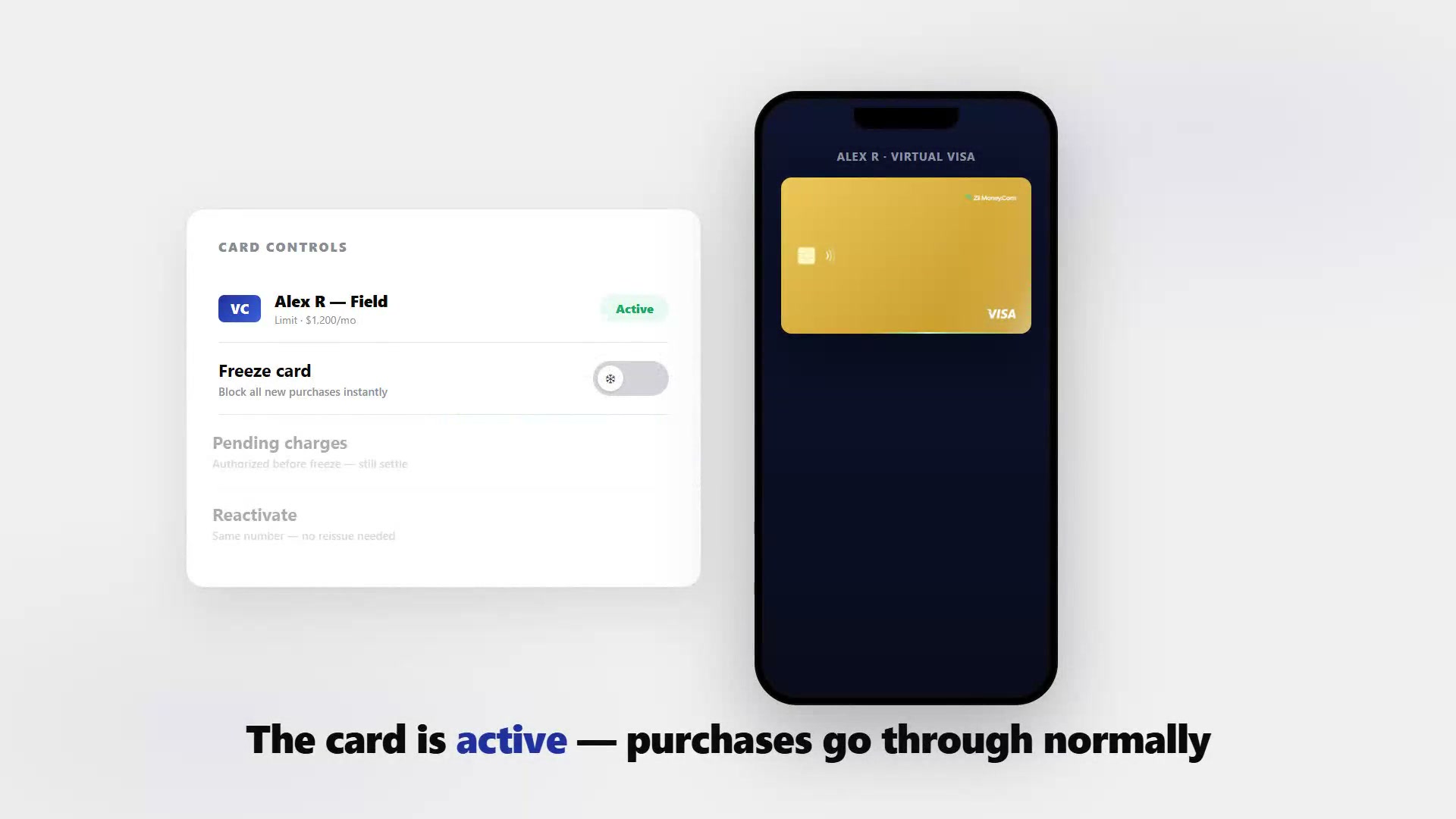
Freezing a virtual card pauses all new purchase authorizations without deleting the card. The card number stays the same, the transaction history is preserved, and the spending limit you set is still in place. When you unfreeze it, spending resumes with no interruption to recurring charges or saved payment methods. The only caveat: charges that were already authorized before the freeze will still clear, because the freeze applies to new requests, not ones already approved by the network.
Most business owners reach for a freeze when something feels off but they are not ready to commit to a full cancel. A card that left with a contractor who has not checked in. A budget that has been used up before the month ends. A subscription that should not renew until next quarter. Freeze covers all of those. Cancel is for permanent situations.
Freeze vs cancel: which one do you need?
Before you go to the dashboard, decide which action fits the situation. Getting this wrong costs you in either direction: cancel when you meant to pause and you issue a new card number that breaks all saved payment methods; freeze when you meant to close it and a former employee uses a card you left open.
| Situation | Use freeze | Use cancel |
|---|---|---|
| Card misplaced, might turn up | Yes | |
| Budget exhausted for the period | Yes | |
| Project on hold, card may resume | Yes | |
| Seasonal worker between assignments | Yes | |
| Employee left the company | Yes | |
| Card was compromised or stolen | Yes | |
| Card issued in error | Yes |
How to freeze a virtual card
The process is the same regardless of which card you are pausing.
- Open your Virtual Card Maker dashboard and navigate to the card you want to pause. Each card has its own detail page showing the balance, limits, locks, and transaction history.
- Find the freeze or pause toggle on the card's controls. It is usually a status switch or a button labeled Pause, Freeze, or Suspend.
- Confirm the action. The card status updates and new authorization requests start being declined from that moment.
- Note any pending charges. Check the transaction list for anything in a pending or authorized state. Those will still settle even though the card is now frozen.
Pre-authorized charges still clear. If a merchant ran an authorization before you froze the card — a hotel hold, a fuel pump pre-auth, a subscription that renewed at midnight — that transaction will still post to your account. The freeze only stops new authorization requests.
What happens to pending charges during a freeze
Payment networks work in two stages: authorization (the merchant asks if the card can cover the charge) and settlement (the money actually moves). A freeze cuts off new authorization requests. Anything that already passed the authorization stage moves to settlement regardless of what you do to the card afterward.
Here is what that looks like in practice:
- A subscription billed at 11:58 PM gets authorized before you freeze the card at midnight. That charge clears.
- A hotel that put a $200 hold on check-in has already authorized that amount. The hold settles even after the card is frozen.
- A contractor who tries to use the card after the freeze gets a decline. No new charges go through.
If a pending charge is the reason you froze the card in the first place, contact the merchant directly to dispute or reverse it. Cancelling the card does not automatically reverse a pending authorization either — you still go through the same dispute process.
How to reactivate a frozen card
Toggle the card back to Active in the same place you froze it. That is it. The card number does not change, spending limits stay as configured, and any wallet or saved-payment-method entry that used this card resumes working.
If the card was in a digital wallet like Apple Pay or Google Pay when you froze it, the wallet entry does not get removed. Reactivating the card means the wallet can process charges again without the cardholder needing to re-add it.
The situation
- Marcus issues a virtual card to each field supervisor for the duration of a placement contract.
- A supervisor finishes a three-month placement on a Friday. The next placement starts in six weeks.
What Marcus does
- Freezes the card on Friday afternoon so it cannot be used during the gap.
- The card history stays attached to the first contract for clean reconciliation.
- Six weeks later, Marcus updates the card limit for the new placement and reactivates it.
- The supervisor taps to pay on day one of the new contract with the same card already in their wallet.
Why cancel would have been worse
- A cancel would have required issuing a new card number, which the supervisor would need to add to their wallet again.
- The transaction history from the first contract would be on a different card, complicating the audit trail.
Using freeze as a budget gate
Freeze is not just for security situations. Finance teams use it as a lightweight budget gate: issue a card with a limit, let the budget run, and freeze it when the period's allocation is spent. No need to cancel and reissue next month — just unfreeze and top up the limit when the new budget comes through.
This works especially well for:
- Quarterly ad budgets that should not roll over to the next quarter.
- Project cards where work pauses between phases.
- Event cards that should be inactive between annual events.
- Contractor cards that run per engagement rather than continuously.
The one time you should cancel, not freeze
When an employee leaves the company, cancel the card. Do not freeze it.
A freeze keeps the card number alive in the background. If that number is saved in the employee's browser autofill or a personal digital wallet, there is a path — however unlikely — for it to be used again if you accidentally reactivate it, or if the card program's freeze has an edge case with a specific merchant type. Cancelling the card terminates the number entirely so that path closes permanently.
Cancel on the last day, not after. Build card cancellation into your offboarding checklist alongside revoking email access and returning equipment. A virtual card is just as much a company asset as a laptop — treat it the same way.
Related reading: What happens when a virtual card payment is disputed or flagged as fraud.
Frequently asked questions
Does freezing a virtual card cancel it?
What happens to pending charges when I freeze a virtual card?
Can I freeze multiple virtual cards at once?
Will the merchant know the card is frozen?
How long can a virtual card stay frozen?
Should I freeze or cancel a card when an employee leaves?
Issue a card with these rules on it.
Set the limit, restrict the merchant, choose the active window, and send the card. Every charge lands in one dashboard, already attributed.
Build one in Card StudioNext, on the same problem.
- Basics
What Is a Business Expense Card? How It Works and Who Needs One
If you have ever found a charge on a shared company card and had no idea which employee made it, a business expense card is the fix. It is a wallet-funded Visa you issue per person, with a spending cap and category locks that fire before the merchant ever processes the charge.
June 25, 2026 · 15 min read - Basics
How do virtual cards work?
A virtual card is a card number you create on screen instead of a piece of plastic. It is funded by your prepaid wallet, capped to a limit you set, and ready to use online, in apps, or in a store through Apple or Google Wallet. Here is what the number actually is, how a payment moves from swipe to settlement, and which controls you can set on each card.
June 17, 2026 · 10 min read - Basics
Virtual Visa card: two different products share this name.
Search "virtual visa card" and the results mix two unrelated things: a business platform that issues per-vendor spending cards, and a one-time gift card sold at a store register. Here's how to tell which one you're actually looking for, and what a business card can do that a store card can't.
August 20, 2026 · 9 min read
The next vendor gets its own Visa card.
Not the shared one. Its own number, its own ceiling, its own line in the ledger.